Team & access
Agreements
An agreement is something a person decides on individually while signing: image rights, house rules, a newsletter opt-in, "my child may walk home alone after training". Each one is a checkbox, and every answer is recorded with the date and who gave it.
Agreements are deliberately not part of the contract template. A contract is one text that is accepted as a whole; an agreement is answered on its own and -- unless you mark it required -- can be declined without the sign-up failing.
Manage them under Settings > Legal, above the contract templates.
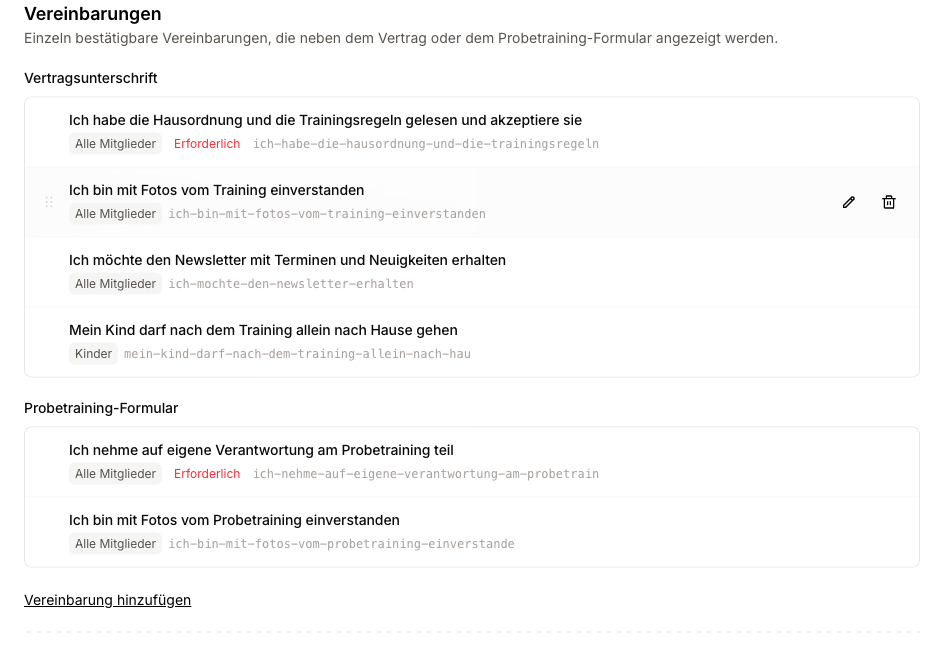
Where an agreement is shown
Every agreement belongs to exactly one surface:
| Shown on | Where it appears |
|---|---|
| Contract signing | The membership onboarding in the member portal, and the contract-signing page an existing member gets when a new contract is sent to them. |
| Trial form | The trial sign-up form on your club website. |
The two are separate lists with separate orders, and a row cannot be dragged from one into the other -- a single order across a trial form and a contract would be two orders pretending to be one. Drag a row by its handle to move it within its list; the new order is saved the moment you drop it, with no save button. That order is exactly what the member sees when signing, and the order the agreements are printed in on the contract.
If you want the same consent on both surfaces, create it twice. That is on purpose: the wording you use for someone booking a first trial session is rarely the wording you want in a membership contract. Answers do not carry over either -- someone who later signs a membership is presented the agreements again and answers fresh, so the signed contract stands on its own as evidence of what was shown that day.
Creating an agreement
Click Add agreement. Creating and editing both happen in a dialog, so there is nothing on the list itself to save.
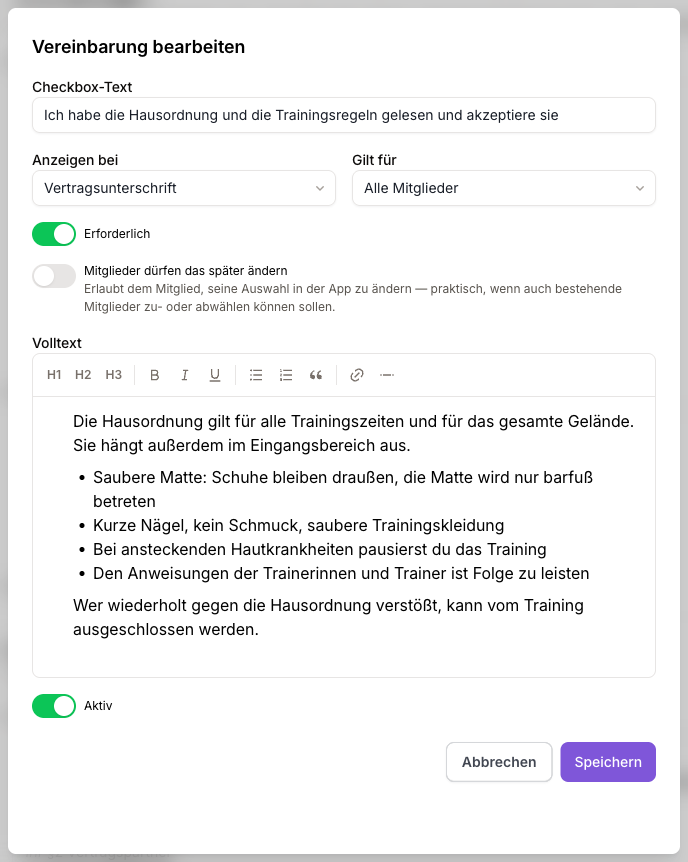
| Field | What it does |
|---|---|
| Checkbox text | The sentence next to the checkbox. This is also the agreement's title everywhere else: in this list, as the heading of the popup, and in the contract. Write it as the member would say it ("I agree that photos from training may be published"). |
| Shown on | Contract signing or trial form -- see above. |
| Applies to | Leave it on All members to show it to everybody, or pick an age group to show it only there. "My child may walk home alone after training" belongs to the kids group; a photo consent usually applies to everybody. |
| Required | A required agreement blocks the submission until it is ticked. An optional one may be declined -- and a "no" is recorded just as deliberately as a "yes". |
| Members may change this later | Marks this as an answer members should be able to revise themselves, rather than one fixed at signing. Useful for things like a newsletter opt-in or a photo consent, where current members should be able to opt in or out too. |
| Full text | Optional. The long policy behind the checkbox -- house rules, a data-protection notice -- with headings, lists and links. The member opens it via a More link next to the checkbox. |
| Active | Turn an agreement off to stop presenting it without deleting it. Answers already recorded stay. |
Leave Full text empty when the sentence on the checkbox already says everything. There is then no More link and no popup -- just the checkbox.
On saving, the agreement also gets a key -- shown greyed out next to the row -- derived once from its text and then frozen. Renaming an agreement never changes it: recorded answers refer to the key, and re-deriving it would split a member's history across two names. If your club website submits sign-ups through the Integration API, the key is also what that site sends back.
What ends up on the contract
The agreements block sits on the contract itself, directly above the signature: the boxes are a declaration in the member's own words, and the signature underneath is what covers them.
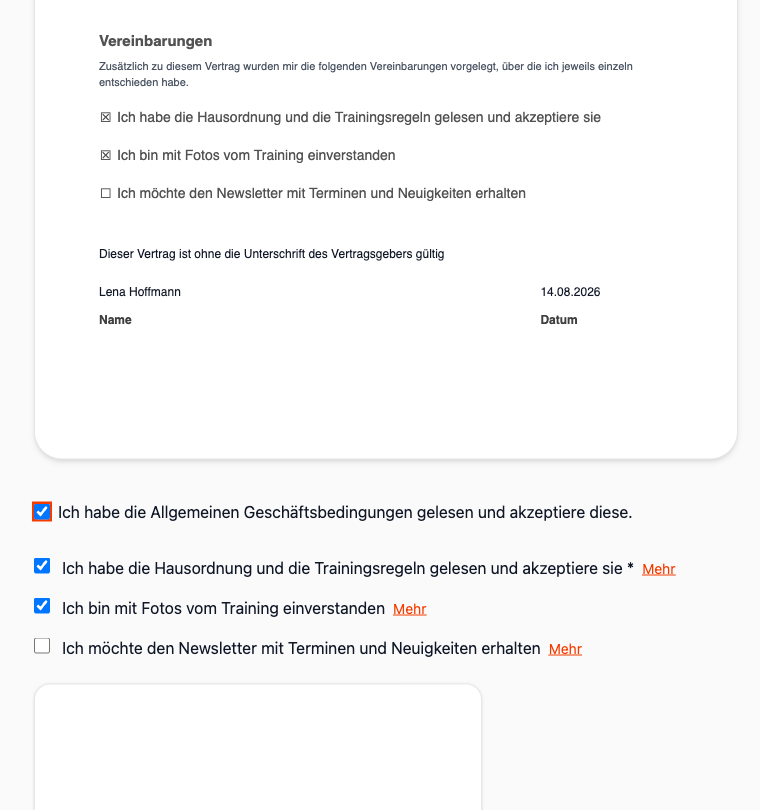
The contract prints the tick or the empty box, the checkbox text, and -- once answered -- the timestamp and who gave the answer. The full text is not printed: it is club policy that reads the same for everybody, and the record keeps its own copy of it anyway.
Because the checkboxes are live, the member is looking at the finished document while they decide. There is no gap between what they ticked and what they signed.
Changing an agreement later
Every answer is stored together with the wording that was on screen that day -- the checkbox text and the full text as they stood. Editing an agreement afterwards changes nothing about what somebody has already signed, and reprinting an old contract shows what was signed then, not what your club says today.
If a member has a signing page open while you edit the agreement, their submission is rejected and the current version is presented again. This is on purpose: recording the fresh text would put them on record agreeing to words they never read, and accepting the old one would let a form held open across a policy change dodge a newly required agreement. The member just reads it once more and signs.
Reading back what members answered
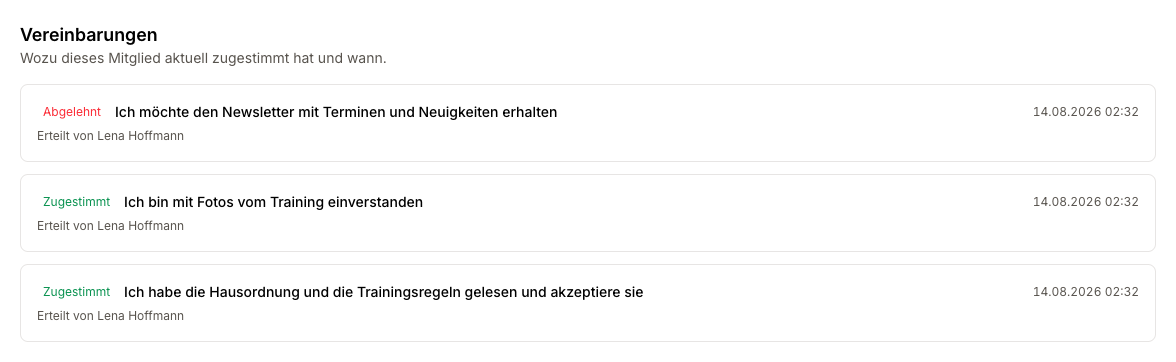
On the member profile. The Memberships tab, below the contracts, shows what that member currently agreed to, when, and who gave the answer -- with earlier answers behind a disclosure. They sit there rather than under Documents because an answer is not a file: it is given while signing a membership and printed into that contract.
In the member list. The filter panel has an Agreements accepted group with one tick per active contract agreement -- useful for checking photo consents before a social-media post. Ticking two means both accepted, and only the current answer counts: a member who later withdrew an acceptance drops out of the results.
Trial agreements are not offered there, since they are answered by leads, who are not in the member list.
Removing an agreement
Removing an agreement stops it being presented. Answers already recorded stay intact and readable on the member's profile -- that is exactly when the record matters.
The key stays reserved permanently, so a new agreement can never inherit a removed one's history.
Agreements and your website integration
If your club website submits sign-ups through the Integration API, it fetches the current agreements and sends the answers back with each registration or trial booking.
Adding a required agreement is therefore a breaking change for that website: submissions fail until it sends an answer for the new key. The settings page warns you about this as soon as an API key is active. Editing the text of an existing agreement is also visible to that site -- a submission built on outdated wording is rejected and has to be re-fetched and shown again.
Optional agreements, and any change to an agreement your site does not present, are safe.