Team & access
Legal
The Legal area is where you manage which legal identity your club collects money under, and the contract terms your members sign. It brings company details, billing entities, and contract templates together in one place.
Navigate to Settings > Legal to manage your legal details.
Billing entities
A billing entity is a legal or collecting identity within your club. It bundles everything needed to collect money under one legal person:
- a SEPA creditor identity (creditor name, IBAN, BIC, creditor ID) and its collection behaviour,
- a bank account used to match bank transactions,
- a FinTS connection to the bank,
- the members billed through it and the invoices that result.
Most clubs only need one entity. But if you operate your club under more than one legal person -- for example a registered association and a private company -- you can split collections across several entities, each with its own bank account, creditor, and FinTS login.
How members are assigned to an entity
Billing is routed per member (payer), not per plan or membership:
- Each member is assigned the entity marked as default at the moment they are created.
- If you change the default later, existing members keep their original entity -- only new members pick up the new default.
- Invoices, memberships, and transactions always derive their entity from the member.
Single-entity clubs
If you use only one billing entity, the system hides all entity selection and behaves exactly as before. You only need multiple entities once you genuinely collect under more than one legal person.
Membership contract templates
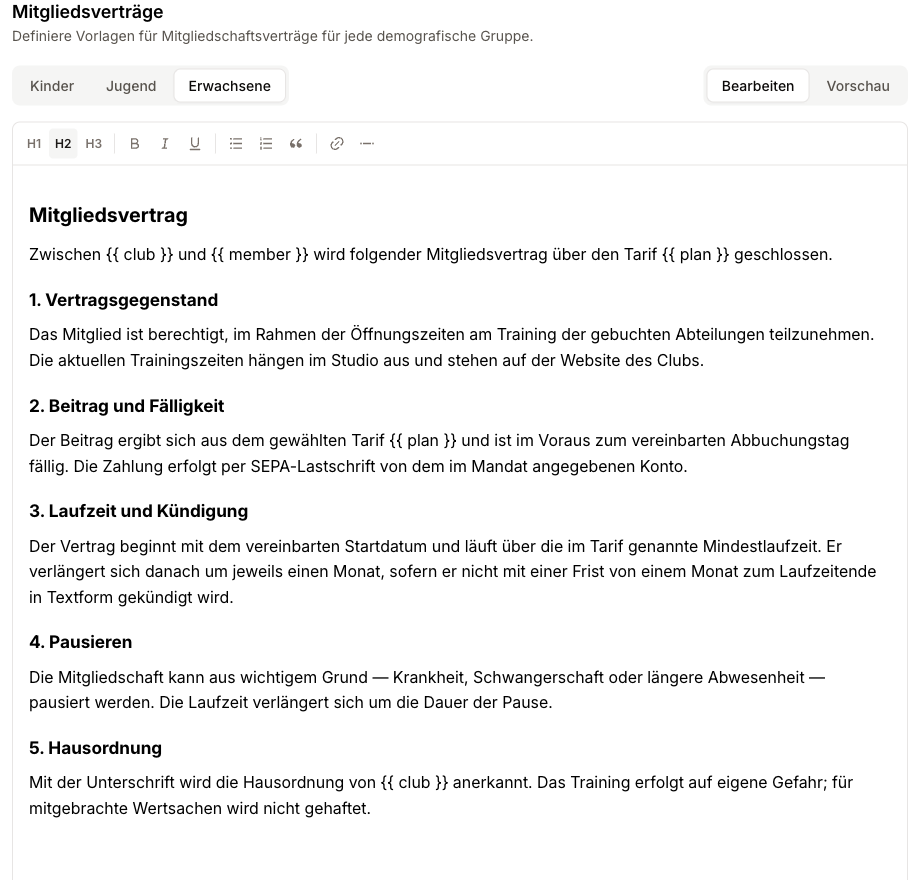
For each member demographic you can store a contract template. This template defines the text a member signs when they join or switch contracts. Adults and children can therefore receive different contract terms, for instance.
The templates are used by the onboarding and contract-signing flows -- for example when a new contract is created from a "Contract expiring" alert and sent to the member for signature.
One tab per member group
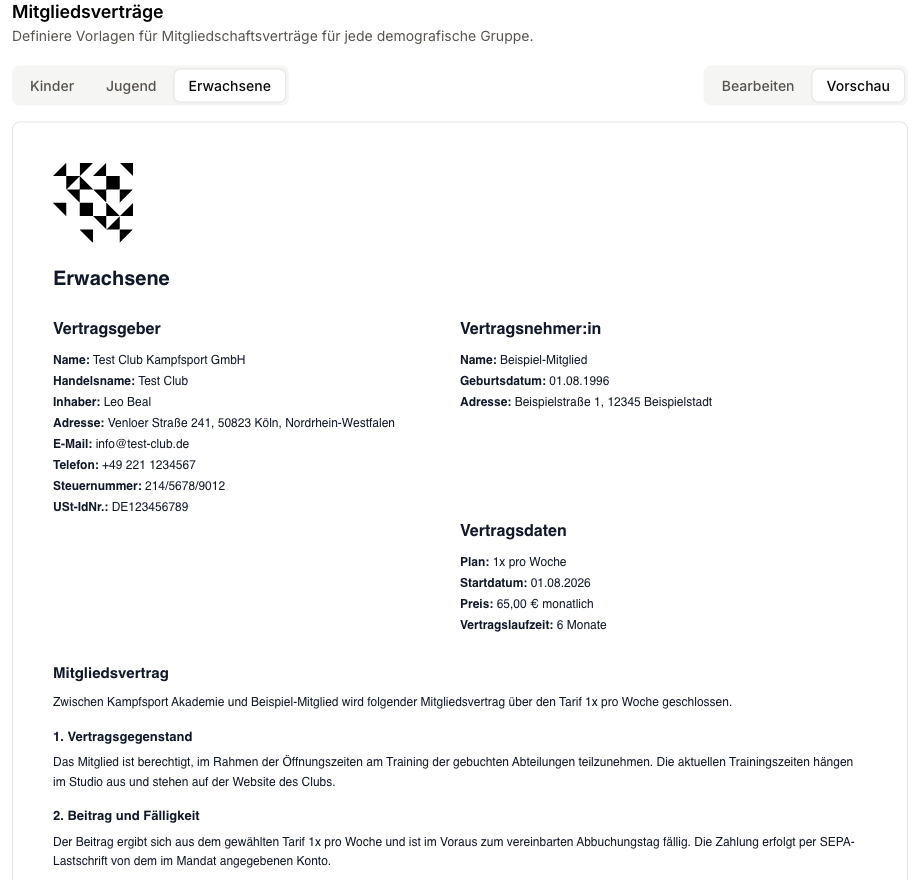
Every active member group has its own tab. Switch between the groups at the top, write a separate contract text for each, and save them all together with Save. The group's name becomes the heading of the finished contract.
Groups you leave empty stay empty -- no contract is shown for them at sign-up and no signature is captured.
Editor and preview
The contract is written in a rich-text editor: headings, bold and italic, lists, links. Tables and images from older contracts are preserved.
The switch in the top right toggles between Edit and Preview. The preview is not an approximation: it renders the very template the PDF is built from -- same typeface, same spacing, same sizes. What you see in the preview is what ends up in the signed document.
Placeholders
Three placeholders stay in the text and are only replaced at signing time:
| Placeholder | Replaced with |
|---|---|
{{ member }} | The member's name |
{{ plan }} | The selected plan |
{{ club }} | Your club's name |
The preview fills them with sample values. Member and membership details (address, term, fee) are also filled in at signing time -- in settings there is nobody to fill them from.
Older contracts
Contracts written in the old plain text field, before the editor existed, are carried over automatically when you open the page and converted for good the next time you save. Until then nothing about them changes. After the first save, take a look at the preview once.
Changes apply from the next signature
An edited contract text only affects future signatures. Contracts that have already been signed are archived as PDFs and never change retroactively.
Agreements
Above the contract templates you define the agreements a person ticks alongside the contract: image rights, house rules, a newsletter opt-in. They are separate from the contract text because a contract is accepted as a whole, while an agreement is answered on its own and can be declined.
Each answer is recorded with the wording that was shown, and appears on the contract right above the signature. See Agreements for the full reference.
Company details
You also maintain your club's legal master data here (company name, address, tax / registration numbers). These details appear on documents and invoices and should match your official registration.